
iOS · Android · PC
Aliens & Zombies Space Wars
Build the team. Hold the planet.
In development — Concept and visual development
Alien defenders against the space-zombie waves
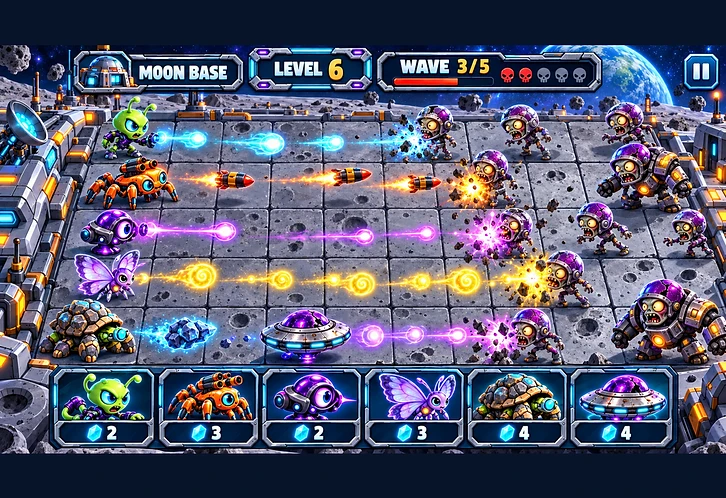
Players build a team of alien creatures and futuristic vehicles to defend against waves of space zombies. Battles take place on planet-themed boards, where players position defenders, use abilities and fire different projectiles to stop advancing enemies.
Around the battles sits a collection game: aliens to recruit, babies to raise in the Hatchery, damaged vehicles to restore in the Workshop, missions to complete and eight worlds to unlock. The tone is colourful, playful and action-packed — expressive aliens, quirky zombies, and a sci-fi setting.
01
Strategic alien-versus-zombie lane-defense battles
02
Eight themed worlds with 15 levels each
03
Collectible aliens with distinct combat roles
04
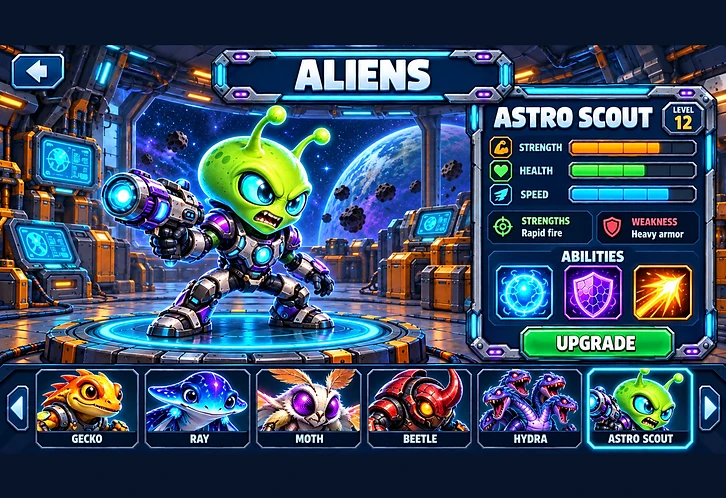
Character levels, stats, strengths, weaknesses and abilities
05
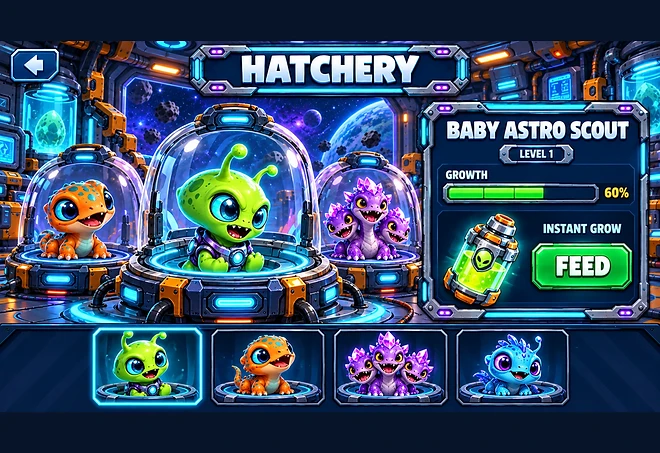
Baby aliens that grow through the Hatchery
06
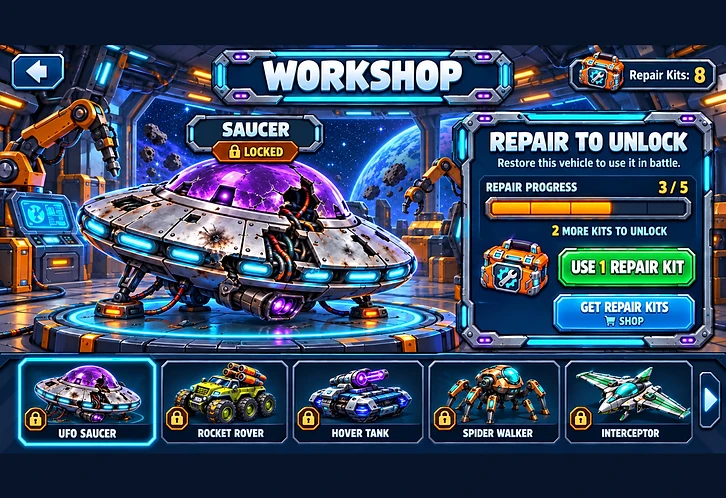
Damaged vehicles restored through the Workshop
07
Different weapons and projectiles
08
Planet Missions and Daily Missions
09
Collectible resources and progression rewards
Line up the team, then hold the board
Each wave is a puzzle of team choice, placement and timing. Different units cover different jobs, which is the reason to keep experimenting with lineups.
Choose your team
Players pick their alien defenders and vehicles before taking on a wave. Every unit has its own strengths, weaknesses, abilities, level and attack, so no single lineup answers every board.
Position and hold
Battles take place on planet-themed boards. Defenders are placed, abilities are triggered and targets are picked in the moment — placement is what decides whether a wave breaks.
Fire everything
Weapons and projectiles run from plasma shots and rockets to energy discs, crystal spears and solar attacks, each tied to the unit that fires it.
Weapons & projectiles

Eight worlds, 120 levels
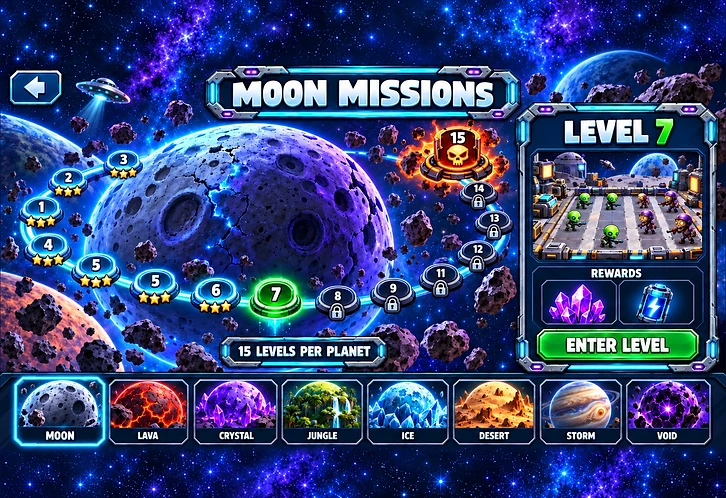
The space map lets players browse eight worlds and select a planet to open its individual level map. Each planet holds 15 levels — 120 across the game — with its own battlefield design and its own themed enemies and bosses.
World 01
Moon
Craters, dust plains and a cold black sky.
World 02
Lava
Molten ground, ash and glowing fissures.
World 03
Crystal
Shard fields and refracted light.
World 04
Jungle
Dense alien canopy and overgrown ground.
World 05
Ice
Frozen wastes and fractured glaciers.
World 06
Desert
Dune seas and sun-bleached rock.
World 07
Storm
Charged skies and lightning-scoured ground.
World 08
Void
The far edge of the star map, where space presses in.

Every creature has a role
The collection screen lets players choose a character and view its level, stats, strengths, weaknesses and abilities before it goes into a lineup.
The expanded asset collection adds 20 alien characters, each with a matching baby version, alongside the earlier alien roster. Concepts include geckos, rays, moths, beetles, tortoises, hydras and other unusual space creatures. Every alien has three ability images, built to support different combat roles.
Creature concepts

Hatchery
Raise a baby into a defender
The Hatchery is where little baby aliens are nurtured and grown into their adult forms. Players use Instant Grow, represented by a futuristic feeding bottle, to advance that growth. The screen shows the selected baby, its level and how far through its growth it has come.
Growth tool

Ten machines, all in pieces
The expanded collection includes 10 alien vehicles — flying saucers, rocket rovers, hover tanks, spider walkers, interceptors, bombers and other space machines. They start damaged and only reach the battlefield once they are repaired.
The Workshop
In the Workshop, players select a vehicle, inspect its damaged state and use Repair Kits to advance its repair progress. Once restored, the vehicle becomes available to use in battle, with a projectile matched to its weapon — rockets, plasma or energy.
Repair resource
Vehicle concepts
Ten vehicles in total, each with its own weapon and projectile.

Something to chase between battles
The game includes Planet Missions and Daily Missions, organised by planet. Progress is tracked on screen and rewards are claimed once an objective is complete.
Planet Missions
Mission concepts include defeating a target number of zombies, winning battles and using abilities — objectives that push players back onto a planet they have already unlocked.
Daily Missions
A daily set of objectives that keeps the same progress-and-claim loop running between planet pushes, with rewards collected in the same way.


Collect, craft, progress
Resources are earned through play, and the store is planned to offer more. Instant Grow supports alien growth and Repair Kits restore vehicles.
The exact uses of the other resources, along with prices and purchase quantities, have not been finalised.
Every battle ends on a summary
Victory and defeat screens summarise the outcome of a battle. Each screen includes space for up to four reward icons and their amounts.
Development status
Everything on this page describes the planned design and the visual concepts created for the game. Aliens & Zombies Space Wars is in development and has not been released — features, balance and content may change before launch.